The Piñata That Would Not Stay Down
Post 5 of 6 about building Rainbow Tile Slide, a puzzle game I shipped to the App Store in September. I'm a product manager, not an engineer. Claude wrote every line of the code. I made the decisions, played it on real hardware, and filed the bugs.
I did not write any of the code that fixed bugs, and I could not have. What I did do, was work hard to verify and, when needed, kick them back as ‘not resolved.’
The screen that looked zoomed in
Early on I added landscape support, and the next night the game screen came back zoomed in and cropped, on my phone and in the simulator. My iPad was fine. Everything about that says scaling. Something is being drawn too big for the space it is in.
Nothing was being drawn too big. The app picks the portrait layout or the landscape one by measuring the screen and comparing width against height, and the measurement was coming back portrait-shaped while the phone was sideways in my hand. So it built the tall stacked layout and squeezed it into a short wide screen. Not scaled wrong. The wrong layout.
Around the same time I reported two other things. Birds were stacking up and hovering above a corner button instead of flying off the edge. A ladybug was spawning in the sky instead of on the grass. I did not think either of those had anything to do with the zoomed screen, or with each other. They were small and cosmetic, and I reported them because they were wrong.
The birds were the zoomed screen again. Every background theme in the game measured the screen for itself, each with its own copy of the same check, and every copy had the same flaw.
That is where the decision was mine. Fix the birds, which is what I had complained about, or fix every place that check existed, which was everywhere. I asked for the sweep. It turned up the same flaw sitting on the Home screen, which nobody had reported.
The ladybug that looked like the same bug
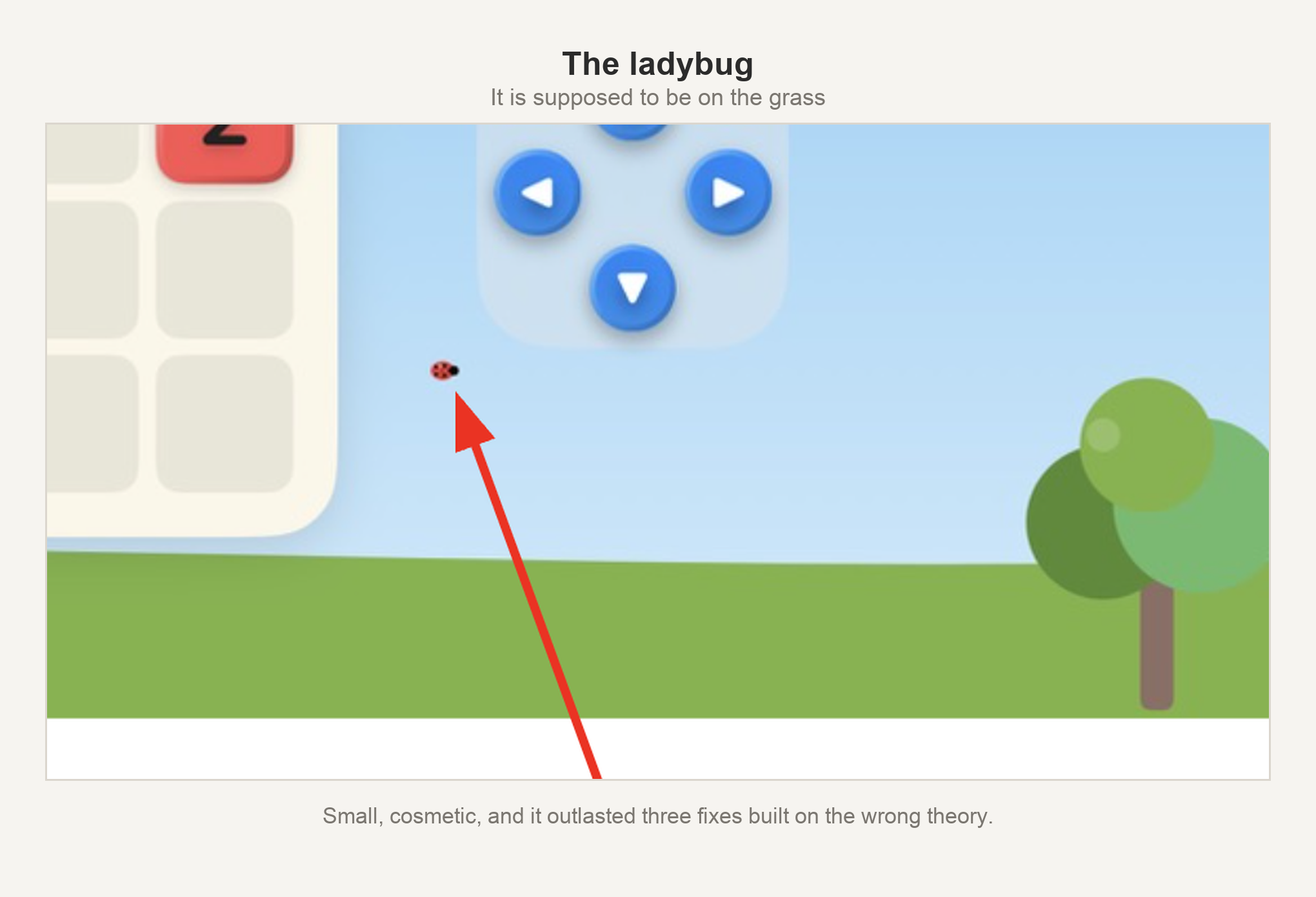
The ladybug got better and did not get fixed. It landed closer to the grass and still not on it, which is the most misleading result a fix can produce, because a partial improvement looks like the right answer applied imperfectly.
It was a different cause, and that cause had already survived three earlier attempts, all of them built on the wrong theory. I had been reporting that ladybug for a while by then. It took one more look, in a different direction, and now it sits on the grass, right where I wanted it.
Two of the three shared a cause. The third only looked like it did, and looking like it had already cost three wrong fixes.
The piñata that would not stay down
One of the five Easy Breezy worlds is a party theme. Every so often a piñata rises from the bottom edge of the screen, peeks, and drops back out of sight. It has a flat, undecorated bottom edge that a player is never supposed to see.
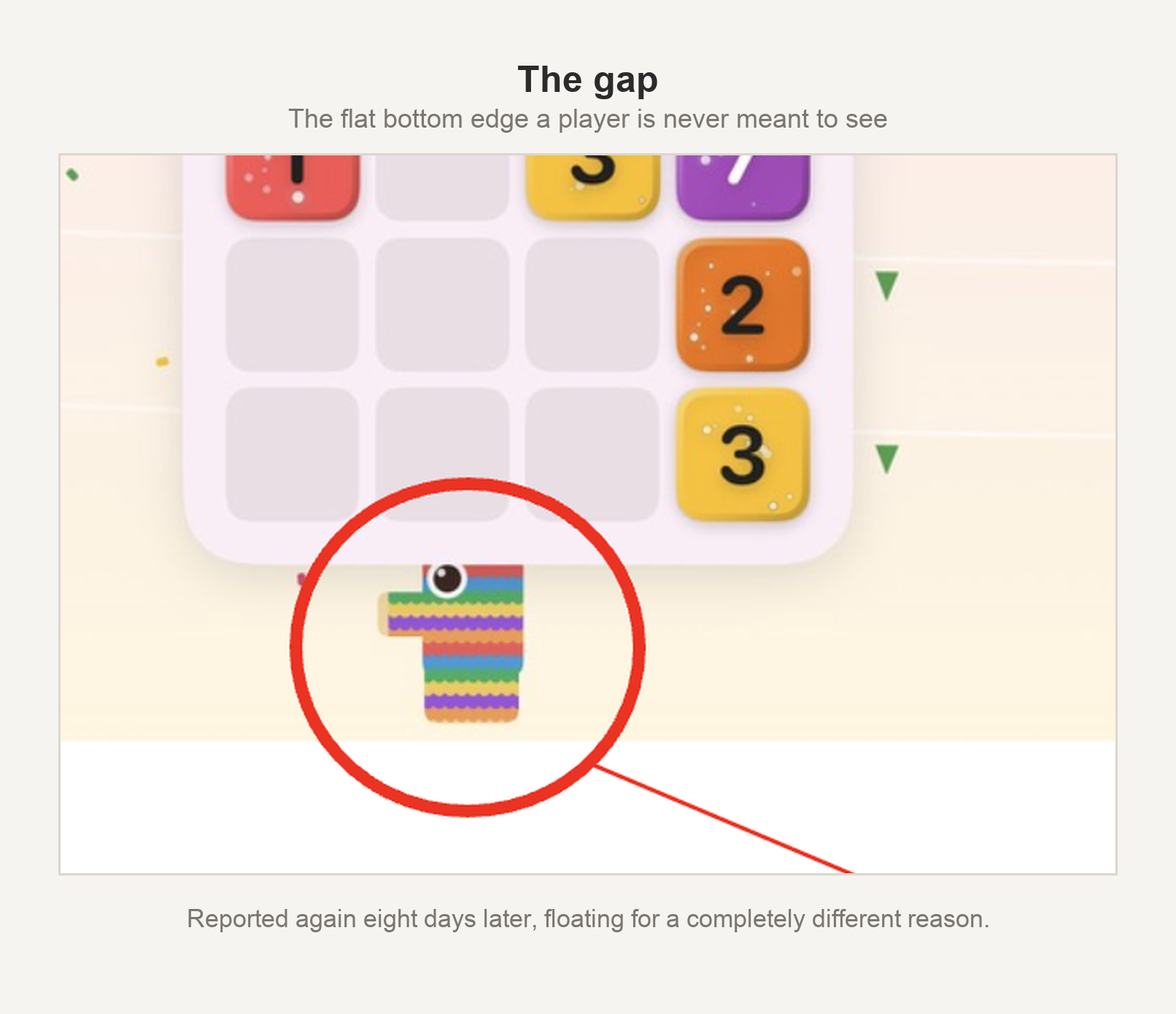
I saw it, and I had seen it before. A week earlier I had reported this same piñata floating instead of emerging from the edge, it had been traced to how the shape's own size was being measured, and it had been fixed that night. This looked like a regression. It was not. Same piñata, same complaint, a different cause underneath.
The second time I described it better. The ear tip was visible constantly, even sitting still, in no animation at all. And while it rose, I could see the end of its unfinished neck. That was the whole thing. The unfinished neck is never meant to clear the bottom of the screen. If I could see it, the piñata was rising further than it was ever designed to rise.
So a debug readout went onto my phone, and I caught a screenshot at the moment the neck was showing. The numbers said the piñata was sitting precisely where the code told it to. Its rise height had been set weeks before, back when the shape was measured smaller than it is, and nobody re-tuned it after a later fix corrected that measurement. Lowered the rise, confirmed on my phone, done.
I kept playing that afternoon and the ear tip came back, always showing.
One more number on the readout found it. On my phone, and no other, the whole party theme was being drawn slightly too small. One setting was doing two jobs: sizing the background scenery, and shrinking the board a little on screens where it did not quite fit. My board needed the shrink. The scenery got it too, and the piñata's hiding place moved up along with everything else. Not far. Far enough to leave an ear showing.
Two days, on a piñata's ear.
The screen that reported it was too tall
Two days before I submitted, I realized the app had only ever run on my own phone, my own iPad, and some generous simulators. I opened it on the smallest iPhone I still supported and found the bottom row of the D-pad below the edge of the screen. One of the four directions was unreachable, in both game modes. I have written separately about why that one stung, since the D-pad exists specifically so the game can be played without swiping.
The first theory was wrong. A limit in the sizing math looked like the obvious culprit, and changing it did nothing.
A live readout said why. The app believed it had 747 points of height to work with. The screen is physically 667. The thing doing the measuring was attached to a container that grows to fit whatever it holds, so once the content overflowed a small screen, the container grew and the measurement described the content instead of the screen.
And that number is what sized the content. Too big produced a too-big measurement, which kept it too big. Capping the measurement against the real screen fixed it, and all four directions came back on screen.
Each Fix Mattered
A cropped screen, a floating piñata and an unreachable button have nothing to do with each other. All three were a number that was not measuring what I assumed it was measuring.
None of them mattered very much on their own. A bird in the wrong corner. A piñata's ear. A phone I do not own. But I could not leave them alone until I knew what was causing them, and that is the part that mattered. One of those three, chased down for the same reason as the other two, was a person not being able to play the game.
I did not know that when I was spending more time than I would care to admit trying to keep a piñata down.
Rainbow Tile Slide is free on the App Store, with no ads: https://apps.apple.com/us/app/rainbow-tile-slide/id6805617800
This is post 5 of 6 about building it. The rest of the series is here.